Fandango: From Confusion to Clarity Through UX Writing
Overview
Building on usability research from the previous semester, this UX writing project transformed Fandango's ticket purchasing experience through strategic content design. The focus centered on improving clarity, transparency, and user confidence at critical decision points in the purchase flow.
Through careful analysis of user needs and iterative testing, the redesign addressed three major pain points using targeted UX writing solutions that reduced friction without adding complexity.
Role
UX Writer
8-9 weeks
Process
- Problem Definition
- Content Strategy
- Prototyping in Figma
- Split Testing (4 users)
- Iteration
Deliverables
- Annotated Prototypes
- Before/After Comparisons
- UX Writing Guidelines
The Challenge
Previous usability research revealed three critical pain points in Fandango's ticket purchasing experience:
1. Pricing Transparency Issues
Users couldn't see ticket prices before committing to a theater selection, forcing repeated backtracking to compare options.
2. Extended Task Completion Time
Average purchase time of 4 minutes and 13 seconds indicated poor information architecture and user confusion about progress.
3. Seat Selection Frustration
For popular films, desired seats became unavailable mid-selection, creating anxiety and abandonment risk.
Understanding User Questions
Before designing solutions, the project mapped what users knew versus what they needed to know at each step:
Key questions users had before purchasing:
- Are there any discounts available for this movie or theater?
- How much will I save by using a deal or membership?
- How many seats are available without going through the entire process?
- What's the final price before I commit?
- Can I compare theaters quickly?
UX Writing Solutions
Solution 1: Theater Page — "Check Prices" & "Check Deals" CTAs
The Problem: Users had no way to preview ticket prices or available deals before selecting a specific showtime, forcing them to commit blindly and then backtrack to compare options.
The Solution: Added prominent "Check Prices," "Check Deals," and "Check Seats" buttons to each theater listing, using distinct colors to catch attention and enable confident comparison shopping.
Before
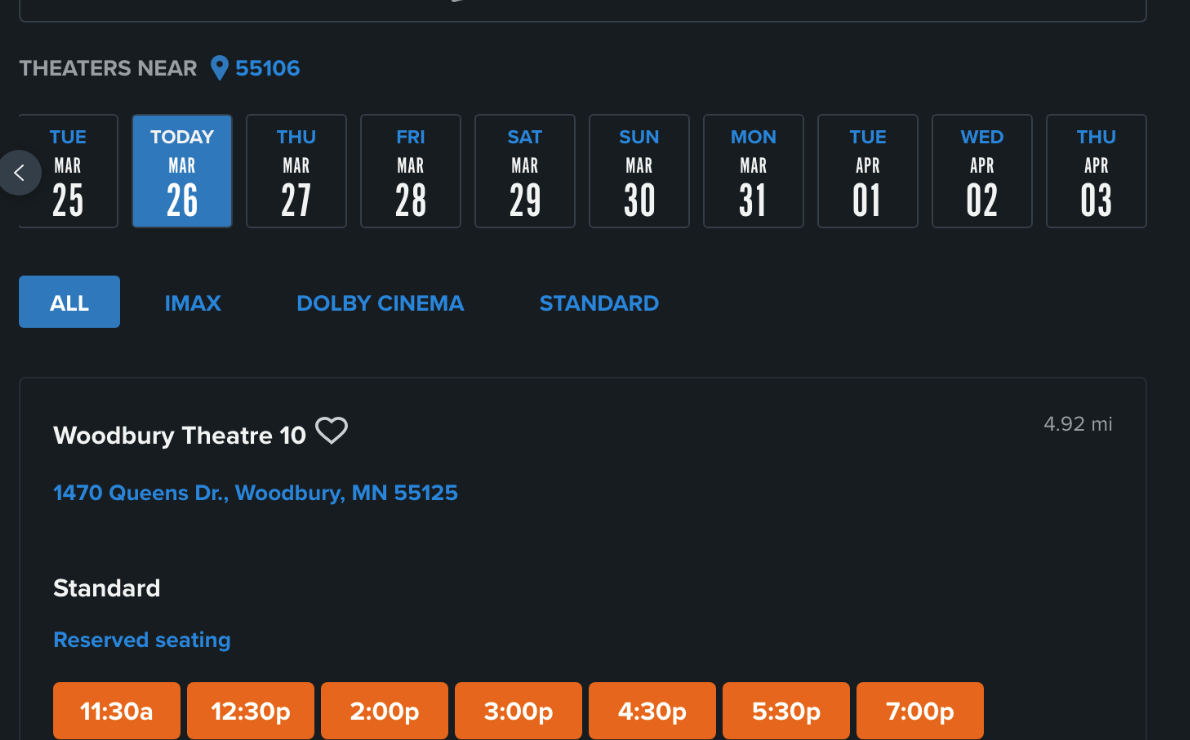
Users had to select a showtime to see any pricing information.
After
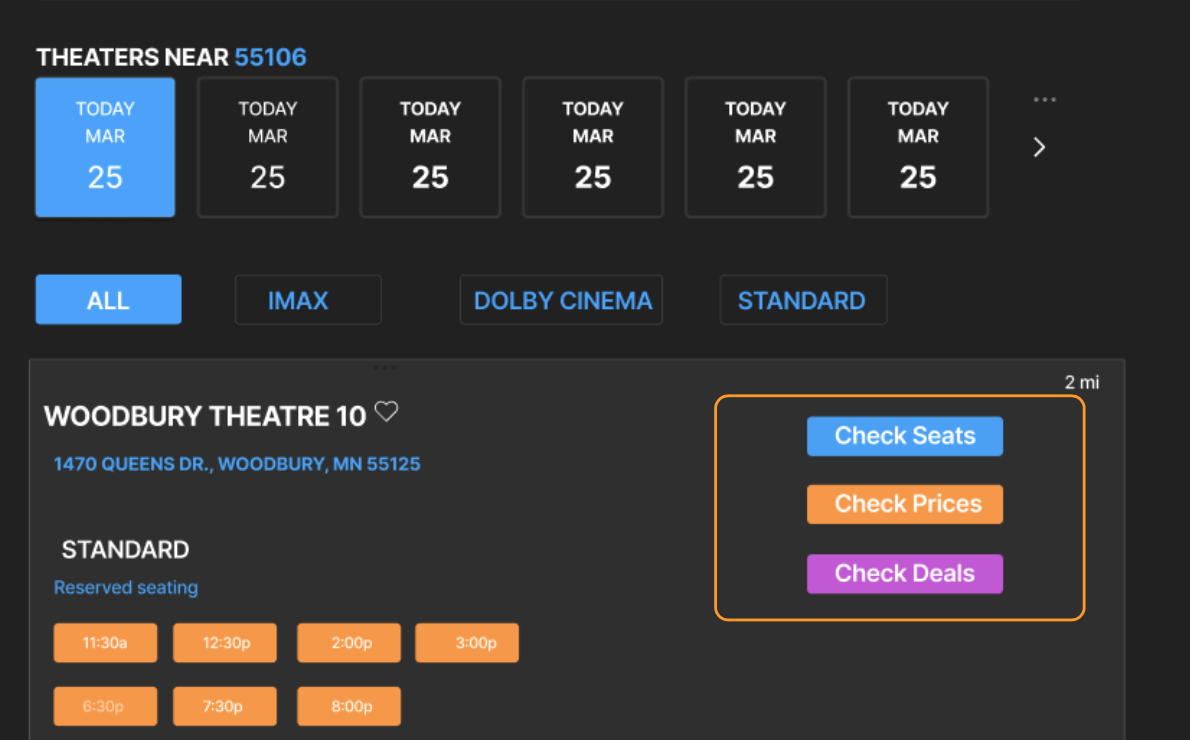
Three distinct CTAs allow users to preview information before committing.
Writing Decisions: Used action-oriented verbs ("Check") rather than passive language ("View" or "See") to encourage interaction. Color-coded buttons (blue for seats, orange for prices, pink for deals) created visual hierarchy and made scanning faster.
Solution 2: Seat Selection — Transparent Ticket Information
The Problem: Users couldn't view ticket types, quantities, or pricing while selecting seats. The "More Info" button was overlooked, and even when clicked, displayed too much information in small font.
The Solution: Consolidated ticket selection, pricing, and seat information into a single view. Replaced the "More Info" button with always-visible ticket type dropdowns showing real-time pricing.
Before
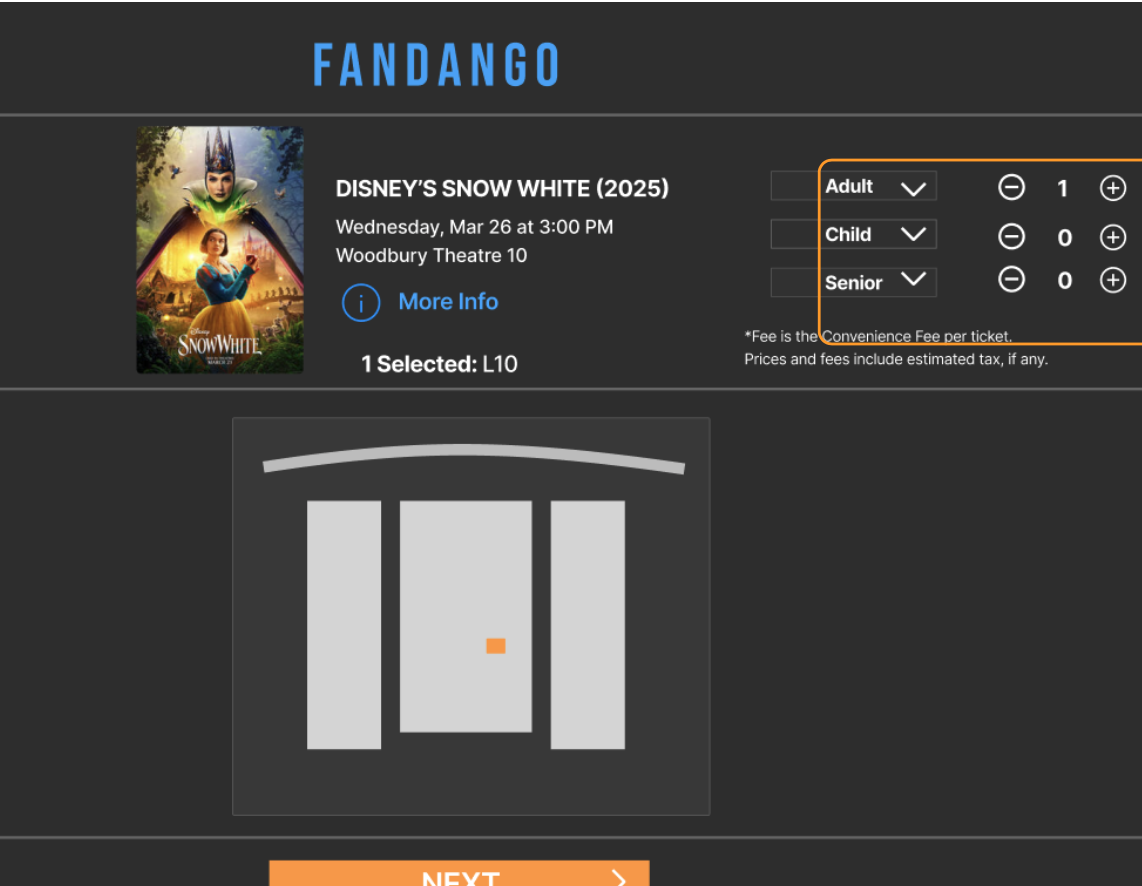
Pricing hidden behind "More Info" button. No ticket selection visible.
After
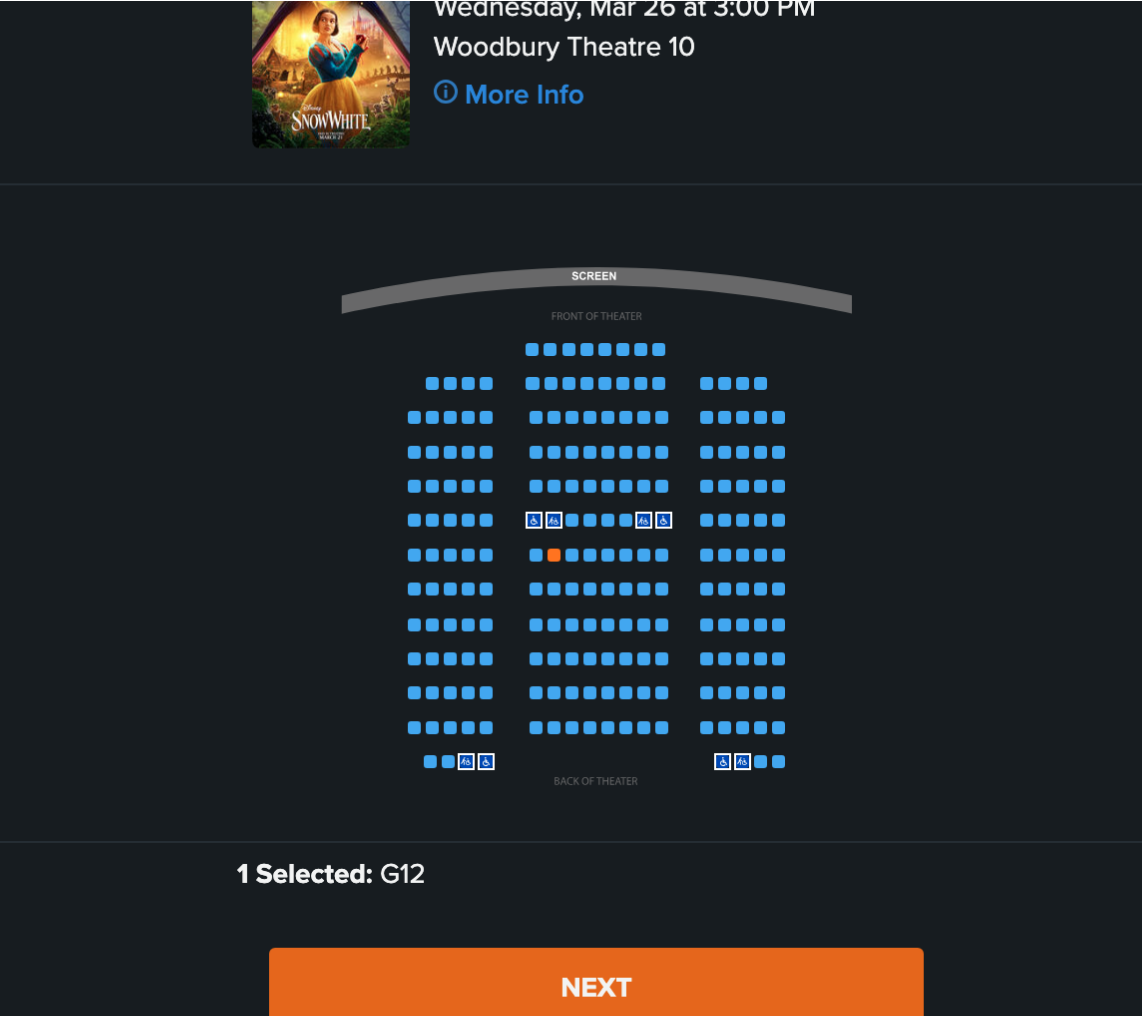
Ticket types, quantities, and pricing visible throughout seat selection.
Writing Decisions: Used clear labels ("Adult," "Child," "Senior") with pricing displayed immediately next to each option. Eliminated jargon and kept microcopy focused on the current task. Testing revealed that users preferred seeing all information at once rather than clicking for more details.
Solution 3: Clear Progress Indicators
The Problem: The original progress bar used numbers (1, 2, 3) that didn't match the actual number of steps, causing confusion. Users didn't know how many steps remained or where they were in the process.
The Solution: Replaced numeric indicators with descriptive step labels: "Seat Selection," "Ticket Review," and "Checkout." Used visual weight (active step highlighted in orange) to show current location.
Before
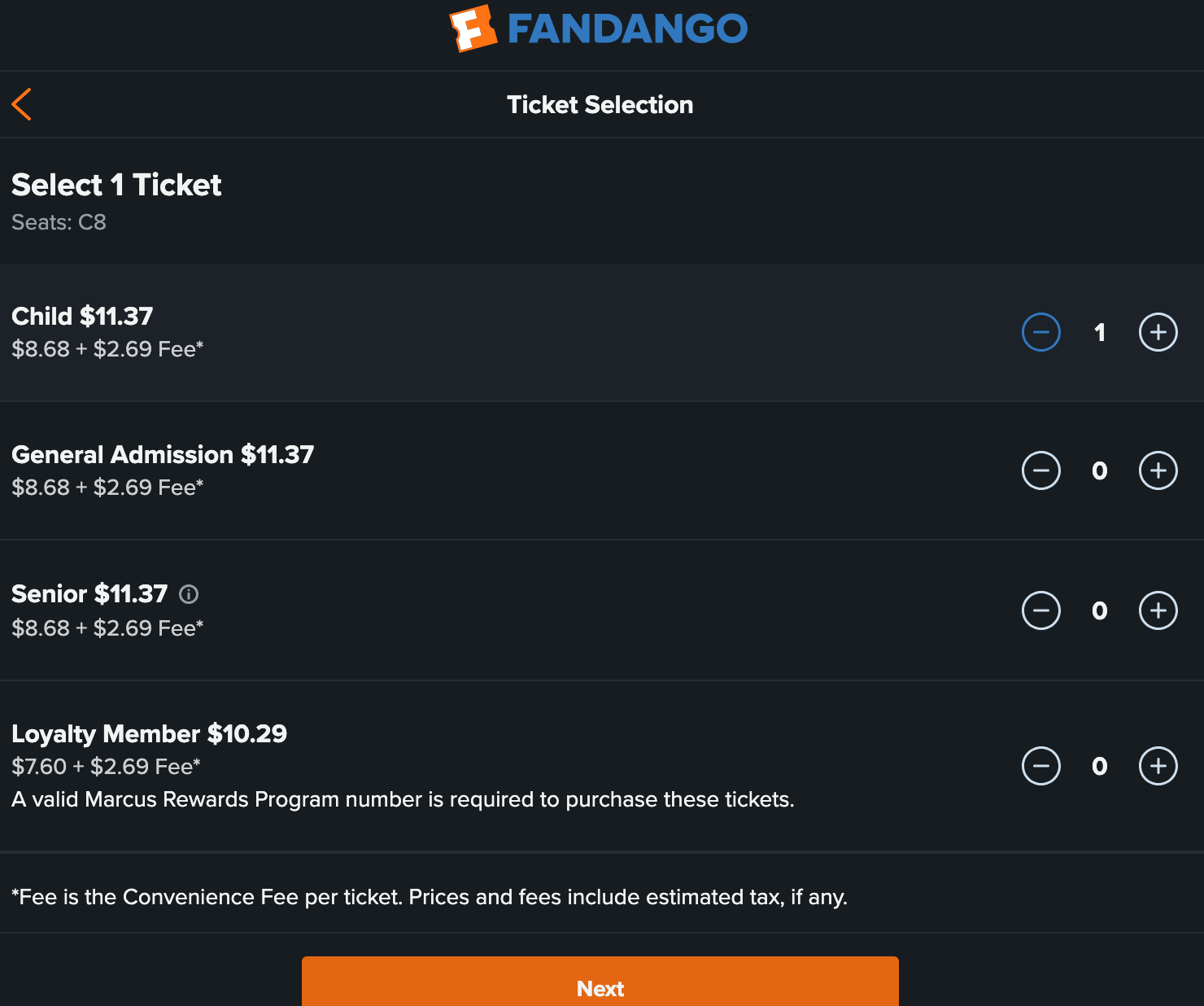
Numbered steps didn't reflect actual flow.
After
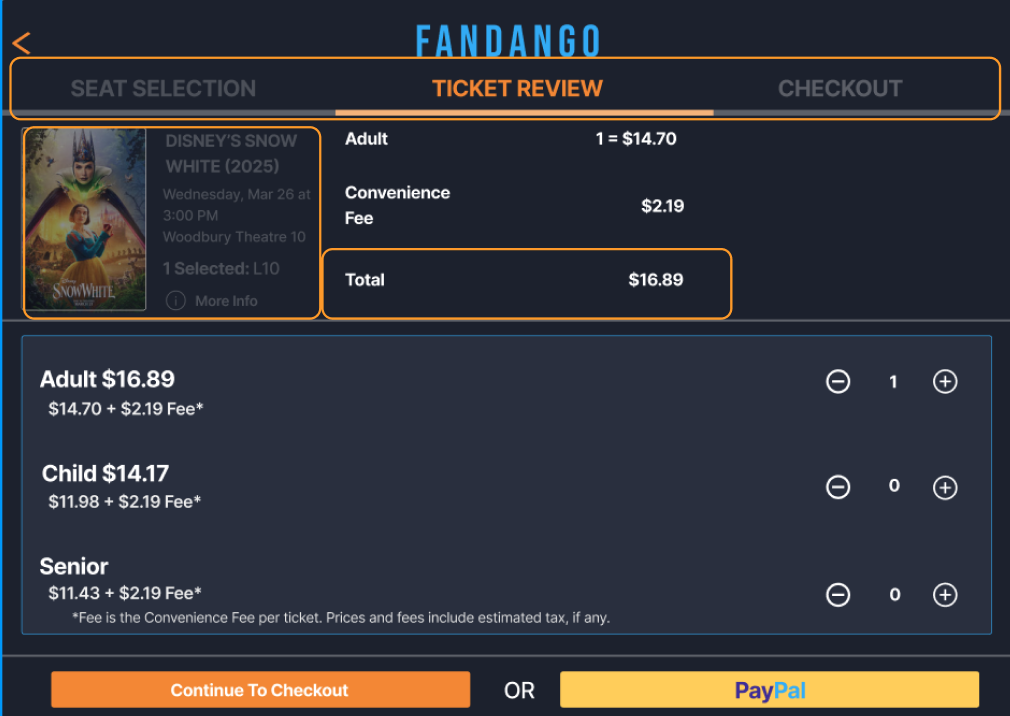
Descriptive labels show exactly where users are in the process.
Writing Decisions: Chose short, specific labels that clearly communicated the purpose of each step. "Ticket Review" was more descriptive than "Review" alone, and "Checkout" signaled the final commitment point.
Design Process
Content Audit & Information Mapping
The project began with a comprehensive audit of existing content and a mapping exercise to understand what information users had access to versus what they needed at each decision point.
This revealed significant gaps: users knew which movie they wanted to see but didn't know how much it would cost, whether deals were available, or if their preferred seats were still open until they were already committed to the flow.
Prioritizing UX Writing Actions
Based on the research findings, content improvements were prioritized by:
- Impact on key metrics: Would this reduce task completion time or improve satisfaction scores?
- Frequency of pain point: How many users encountered this issue during testing?
- Implementation complexity: Could this be solved primarily through content changes?
Balancing Clarity with Information Density
One challenge was providing more information without overwhelming users. The solution focused on progressive disclosure — showing essential information upfront while keeping detailed breakdowns accessible through clearly labeled interactions.
Testing & Validation
Split Testing Methodology
To validate the UX writing improvements, the project used a split testing approach with think-aloud protocols:
Group A (Control): 2 participants tested the original Fandango website
Group B (Test): 2 participants tested the redesigned prototypes with UX writing improvements
While a larger sample would be ideal for full A/B testing, this split test approach provided valuable qualitative insights about content effectiveness.
Key Findings
"Wow this is super helpful."
"Wish all the other theaters had this."
"That's all I wanted to see, I would have booked movies faster if they had these options."
From the Control Group: Both participants expressed confusion about the progress bar numbering, noting there were more than three steps in the actual flow. This validated the need for clearer progress indicators.
From the Test Group: Participants responded enthusiastically to the "Check Prices" and "Check Deals" buttons, immediately understanding their purpose. The visible ticket selection and pricing during seat selection reduced uncertainty.
Unexpected Finding: Both groups expressed wanting to see their seat selections, ticket choices, and pricing all on the same page. This led to iterating the design to create a more consolidated view in the ticket review step.
Iterations Based on Feedback
Testing revealed that while the "More Info" button was an improvement, users still wanted more immediate access to information. The final iteration moved ticket type selection and pricing directly into the main view rather than behind any interaction.
Impact & Reflection
What Changed
The UX writing redesign successfully addressed all three major pain points identified in the original research:
Pricing Transparency: Users gained upfront access to pricing and deals through clear, action-oriented CTAs, eliminating the need to commit before comparing options.
Task Completion: Clear progress indicators and consolidated information reduced cognitive load and helped users understand where they were in the process.
Seat Selection Confidence: Visible pricing and ticket information during seat selection allowed users to make informed decisions without anxiety about hidden costs or availability.
Key Learnings
Strong research foundations lead to effective content solutions. By building on comprehensive usability research from the previous semester, the UX writing could target specific user needs rather than making assumptions about what information would be helpful.
Small copy changes can create significant usability improvements. Strategic button labels, clear progress indicators, and well-placed pricing information dramatically improved user confidence without requiring major redesign work.
User testing reveals unexpected content needs. While the research identified what information was missing, testing revealed how users wanted to access that information — leading to iterations that consolidated views rather than hiding details behind interactions.
Future Opportunities
Additional areas for optimization include refining the deals messaging to better communicate value, exploring personalization opportunities based on user history, and testing whether additional microcopy during checkout could further reduce abandonment.
Explore More Projects
See how UX research, technical writing, and design come together across different projects.
View All Projects →